
Best Ever Opportunity to Join Lifetime Memberships | Biggest SALE of the YEAR | Join Now

JoomUnited WP Table Manager
  • version Version: 4.2.1
  • Last Update Last Update: Dec 3, 2025
JoomUnited WP Table Manager

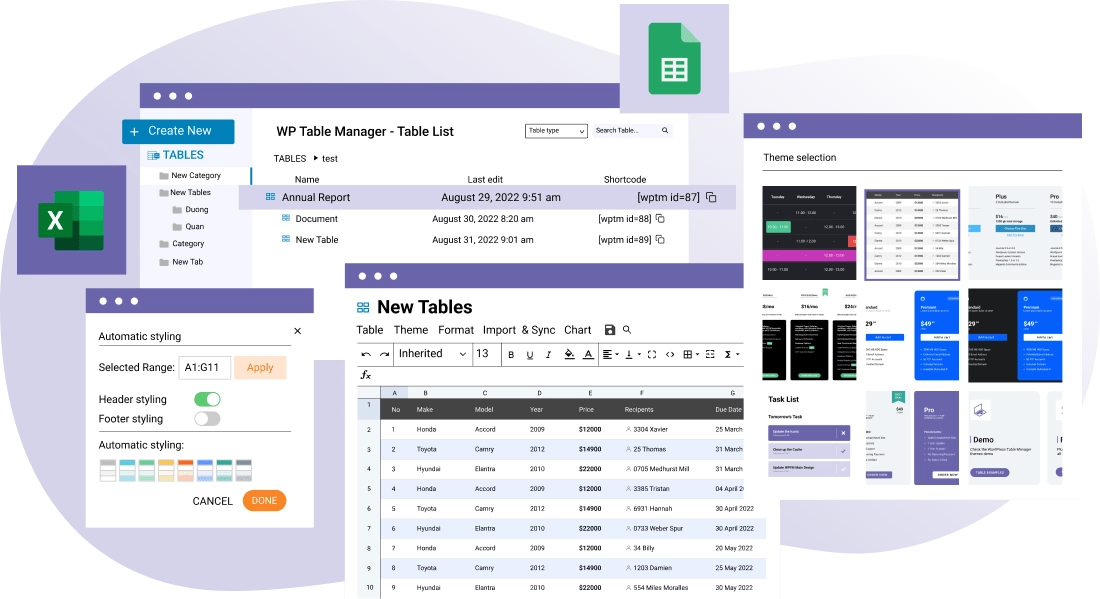
WP Table Manager is the only WordPress table plugin that offers a full spreadsheet interface to manage tables. Create a table, pick up a theme and start editing tables right away. You’ll enjoy a set of powerful table edition tools, such as: HTML cell editing, table copying, calculation, Excel and Google Sheets synchronization. As end user, editing a table is as simple as clicking on cell, and editing data with or without a visual text editor.
JoomUnited WP Table Manager

Price: $3.59

View Original Product & Demo

WP Market Hub FAQ

Why should I buy plugins and themes from your website?
  • Because we will give you original product without malware at low price.
  • All products will work on unlimited domains.
  • We update all our products regularly.
Where can I see my order details?

You can view all information related to your account and orders here (https://wpmarkethub.com/my-account/)

Can I get a refund?

You may be eligible for a refund if:

  • You did not download the product.
  • The product was completely non-functional, damaged, or misleading (i.e., it doesn’t do what the description promises).
  • You submitted a support request and we were unable to resolve the issue.
After purchasing a product from your website, how long can I download it freely?

You can download it for free for one year from the date of purchase.

Do you provide technical support?

No, but we will provide you basic support for installing plugins and themes. If you need technical support for themes and plugins, we suggest you to purchase directly from the product author.

How can i contact you?

Please contact us. And you can also contact us from here (support@wpmarkethub.com)

Users Experience

Description of JoomUnited WP Table Manager

JoomUnited WP Table Manager

WP Table Manager is the only WordPress table plugin that offers a full spreadsheet interface to manage tables. Create a table, pick up a theme and start editing tables right away. You’ll enjoy a set of powerful table edition tools, such as: HTML cell editing, table copying, calculation, Excel and Google Sheets synchronization. As end user, editing a table is as simple as clicking on cell, and editing data with or without a visual text editor.

Save Time in Table Edition

Tables are not easy to manipulate in HTML, and WordPress does not offer a native tool to do that. How does editing tables like in a spreadsheet sound? All it takes is clicking on a cell, editing the data and voilà! It’s saved automatically. You save time and not even a user mistake can break your table layout.

Powerful and Responsive WordPress Table Plugin

Easy-to-use does not mean basic at all. You have tons of tools available to edit your table including visual tools for color, borders, border radius, tooltips and more. Each cell can also be modified with the WordPress visual editor with all features available. There’s several responsive modes to handle how your tables looks like on mobiles.

Themes and Colors for Tables

WP Table Manager comes with 6 themes. Themes have been built from the plugin so it means that everything is editable. For example, add the planning theme, change the hours with your data and you’re done. You can even create your own from scratch because tables can be copied in a click. You can also create your own alternate 2 lines colors set and apply it on a selection of table cells.

Table data sort and filter

Filtering and ordering are essential features while displaying a large table on frontend. There is no faster way to reach the necessary information by combining these.

WordPress Excel Plugin: Synchronization with Excel files & Google Sheets

An Excel import & export tool is available for each table. Save a lot of time, import your spreadsheet file, create your layout, and publish it. What can I import/Export? you can import all data + some Excel styles or only the data and preserve your table style. The styles compatible with Import/Export are cell background color, font color, font size, borders, Links (HTML format).

You can also synchronize an excel file with a WordPress table. You just need to select an Excel file on your server and activate an automatic synchronization of the data.

Google Sheets Import/Export and synchronization plugin

Yes, you read it right. Select any Google Sheets from Google Drive and you can make an automatic synchronization of the data. You can import all data + some Google Sheets styles or only the data and preserve your table style.

A Google Sheets import and export tool is also available for each table. Save a lot of time, import your Google Sheets file, create your layout, and publish it. An export button can also be used for customers from the frontend.

  • DAILY UPDATES

    We update our repository daily so that you are always up to date on the performance of the tools you use. Surprise yourself with constant additions of new products as well!

  • HUGE SAVINGS

    Your web project will be a success without your wallet hurting, that's why you will always have the best tools with incomparable offers. Build a premium website at a fraction of its cost.

  • USE IT ON ALL YOUR WEBSITES

    No limits. Use every product on all your websites. Not only that, if you decide to leave the our website, the product you have downloaded will continue to work.

JoomUnited WP Table Manager gpl plugin, JoomUnited WP Table Manager gpl theme, wp gpl plugins, gpl themes and plugins, wordpress gpl themes, wp gpl site, wordpress plugin discounts, gpl themes, gpl theme, gpl plugin, wordpress cheap plugins, wordpress gpl plugins