
 Version: 0.4.8
  Last Update: Jun 7, 2024
 One of the most significant pages inside WooCommerce is the WooCommerce My Account page. For your clients, it contains essential data such as orders, their address, payment methods, account information, and other endpoints. Since the My Account page is such an essential data center, shop owners might want to add new custom endpoints for my account to display other details and modify the My Account page’s look and feel.
 Version: 0.4.8 Last Update: Jun 7, 2024
 One of the most significant pages inside WooCommerce is the WooCommerce My Account page. For your clients, it contains essential data such as orders, their address, payment methods, account information, and other endpoints. Since the My Account page is such an essential data center, shop owners might want to add new custom endpoints for my account to display other details and modify the My Account page’s look and feel.
WooCommerce Custom My Account Pages —
One of the most significant pages inside WooCommerce is the WooCommerce My Account page. For your clients, it contains essential data such as orders, their address, payment methods, account information, and other endpoints. Since the My Account page is such an essential data center, shop owners might want to add new custom endpoints for my account to display other details and modify the My Account page’s look and feel.
Here comes the Customize My WooCommerce Account that handles this by allowing you to add any number of custom endpoints and content from my account. Via the build-in style customizer screen, you can sort the tabs as per the priority and even customize the interface.
Customizing My WooCommerce Account gives you full leverage over the My Account page of WooCommerce, enabling you to build new endpoints, connections, and groups of accounts. It also enables you to customize the dashboard tabs, buttons, links, fonts, avatars, etc. of the account to fit the theme of your platform. To build new windows, no more playing with code. With ease, you will be able to build, re-order, conceal, disable, and delete tabs. You will also be able to build your own custom template using the customization wizard, close to the WordPress customizer, with no more CSS coding to customize tabs.
Primary characteristics
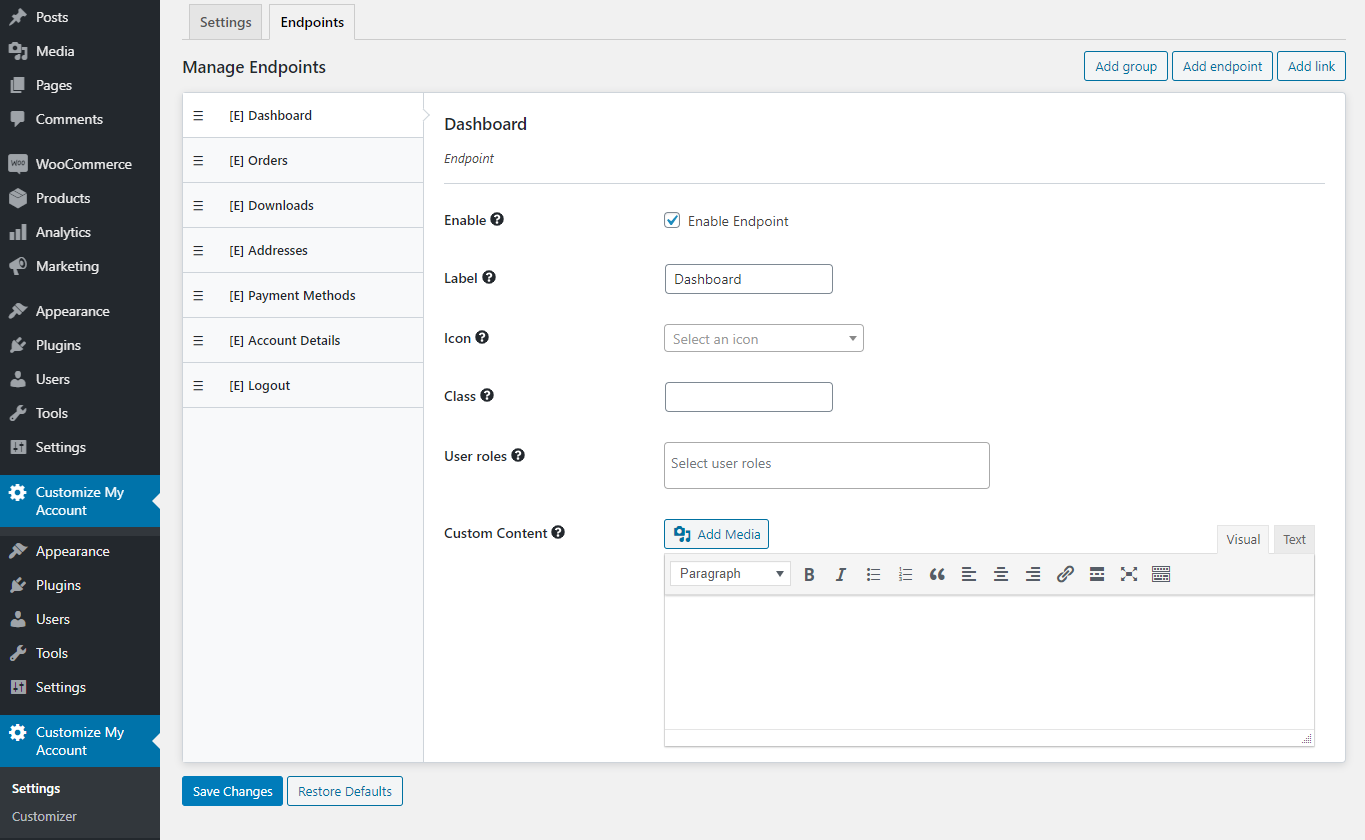
Add, delete, and reorder My Account Dashboard endpoints(tabs), connections, and classes.
Change labels, add icons and view endpoints with custom content (text, media, or form).
Enable access to the endpoint for unique user roles.
Hide/Disable Tabs with one click.
Adjust the look and feel of an account page with a live editing preview with a strong customization screen.
Adjust the font, font size, color, picture and background color, border, padding, margin, etc.
Customizable template editor tool, easy-to-use.
Add a custom CSS code of your own.
Add Custom My EndPoints Account Easily (Tabs)
It is super quick to add My Account Endpoint. Click on the Add Enpoint tab, call it and you’re done. The content for that endpoint can then be entered, icons added, control roles set and more.
The enpoint location is also easily sorted by easy drag and drop as to how they appear.
Group Together EndPoints
It is straightforward to group related endpoints together. It’s close if you are familiar with the WordPress Menu structure. Build a category easily and add endpoints within it.
It’s now a breeze to customize the account page according to the style of your platform. Just launch our customization panel and start editing the color, backdrop, font, spacing, and more. To accomplish these interface modifications, you don’t need to be a CSS master. Click save until done and that’s it.
Get full control over My Account Page from WooCommerce. To build new custom tabs, no more playing with coding. Visually design my account page with Live Customizer
We update our repository daily so that you are always up to date on the performance of the tools you use. Surprise yourself with constant additions of new products as well!
Your web project will be a success without your wallet hurting, that's why you will always have the best tools with incomparable offers. Build a premium website at a fraction of its cost.
No limits. Use every product on all your websites. Not only that, if you decide to leave the our website, the product you have downloaded will continue to work.
WooCommerce Custom My Account Pages gpl plugin, WooCommerce Custom My Account Pages gpl theme, wp gpl plugins, gpl themes and plugins, wordpress gpl themes, wp gpl site, wordpress plugin discounts, gpl themes, gpl theme, gpl plugin, wordpress cheap plugins, wordpress gpl plugins